
New Vloggi Oggi octopus Header logo
  • Use cases
    • Video Reporting Software
    • Video Contest Software
    • Video Audition Software
    • Video Consent Software
    • Video Survey Software
    • Video Message Software
    • Video Submission Software
    • Vloggi Video Software Features
  • Industries
    • Advocacy and non-profits
    • Media & Entertainment
    • Marketing & advertising
    • Education
    • Internal communications
    • Events
    • Government
    • Travel & tourism
    • Weddings
  • Case studies
    • How metal band crowdsourced music video for $2000
    • How a premium toy brand used video to gather market research
    • Secure video auditions for NSW exam board
    • Dude Perfect Trick Shots
    • How a major union gathers grassroots supporter stories in videos
    • AVON Corporate Event Videos
    • Nick DiGiovanni Viewer Engagement
    • Hamilton Crowdsourced Music Video
    • MYOB Asynchronous Video Meetings
    • NESA Education Video Applications
    • AFTA Video Advocacy
    • JAX Tyres Customer UGC Video
    • JUCY UGC Video Contest
    • Fishburners Community Engagement
  • Resources
    • Restoring Trust in Video – Real video in the age of AI slop
    • FAQs
    • Blog
    • About us
    • Documentation
    • About Justin Wastnage
    • Free eBooks
  • Pricing
  • Use cases
    • Video Reporting Software
    • Video Contest Software
    • Video Audition Software
    • Video Consent Software
    • Video Survey Software
    • Video Message Software
    • Video Submission Software
    • Vloggi Video Software Features
  • Industries
    • Advocacy and non-profits
    • Media & Entertainment
    • Marketing & advertising
    • Education
    • Internal communications
    • Events
    • Government
    • Travel & tourism
    • Weddings
  • Case studies
    • How metal band crowdsourced music video for $2000
    • How a premium toy brand used video to gather market research
    • Secure video auditions for NSW exam board
    • Dude Perfect Trick Shots
    • How a major union gathers grassroots supporter stories in videos
    • AVON Corporate Event Videos
    • Nick DiGiovanni Viewer Engagement
    • Hamilton Crowdsourced Music Video
    • MYOB Asynchronous Video Meetings
    • NESA Education Video Applications
    • AFTA Video Advocacy
    • JAX Tyres Customer UGC Video
    • JUCY UGC Video Contest
    • Fishburners Community Engagement
  • Resources
    • Restoring Trust in Video – Real video in the age of AI slop
    • FAQs
    • Blog
    • About us
    • Documentation
    • About Justin Wastnage
    • Free eBooks
  • Pricing
Get Started
Login
Book demo

How can we help you?

Getting started - the core features of Vloggi

3
  • A short Vloggi glossary: understanding common video submission terms
  • How to collect, curate and combine user-generated videos at scale with Vloggi: An overview
  • Vloggi’s Enhanced Video Format: Enhancing Video Quality and Consistency

Configuring Vloggi for your your video submission project

8
  • Vloggi – creating your first video submission project
  • Which video template is best for my first Vloggi video submission project?
  • How to Gather Contributor Data in Vloggi’s Video Submission Software
  • How to Use the Vloggi Video Template Builder (Dynamic, Static, and Visual Elements)
  • How to create a lookup table by uploading existing datasets of contributor information to Vloggi
  • How to Format a CSV Dataset for Use in Vloggi
  • Building for the Vloggi Integrations Marketplace
  • Accessing the Public Vloggi API for Advanced Users

Collecting video submissions from your contributors

12
  • How to write a successful landing page to maximize video submissions
  • Why you should add a welcome video to your video submission landing page
  • Collecting Additional Contributor Data for Video Overlays: Simplifying the Process
  • 8 Tips to higher response rates for your video submission project
  • A killer email marketing sequence script for video submission campaigns
  • Where do I share my video submission project upload link?
  • How to enable webcam responses to video questionnaires on Vloggi
  • Building a Video Questionnaire in Vloggi: Enhancing Engagement and Insight
  • How to Change Contributor Languages in Vloggi
  • Using Vloggi’s QR Codes to Collect Video Footage at Physical Events: A Comprehensive Guide
  • Embedding the Vloggi Video Submission Widget on Your Website
  • Do I need to incentivise my audience to contribute video submissions?

The commercial details of your Vloggi subscription

4
  • How to set up your account branding in Vloggi: adding your colors, fonts and logo
  • How do I update my billing details in Vloggi?
  • Upgrading Your Subscription in Vloggi: A Comprehensive Guide
  • Downloading an invoice from Vloggi or Payment Receipt after subscription

Clearances and re-use permissions of video submission

5
  • How to gain re-use permission and copyright on video submissions
  • Guide to reportage filming: Understanding the rules and regulations of public video submissions
  • Additional legal consideration: The avoidance of hate speech
  • How to Set Legal Entity, Privacy and Declaration Details in Vloggi
  • Understanding IP Address Collection in Vloggi

Curating your video library with Vloggi

12
  • What is Vloggi templated video production?
  • Ways to manage your user-generated video library in Vloggi
  • How to delete videos from your Vloggi user-generated video library
  • How to download video submissions from my Vloggi library?
  • How do I make video compilations without editing software?
  • How to combine video clips together in Vloggi to create a compilation
  • Creating a master template in Vloggi to automate video creation from UGC
  • How to download video submissions in bulk as zipped folder on Vloggi
  • Inviting Collaborators to Vote on a Video Contest: A Collaborative Judging Process
  • How to pre-populate contributor data in Vloggi
  • Quick Help Guide: Downloading Raw Video Clips or Vertical Videos from Vloggi
  • Quick Help Guide: Resolving Known Vloggi Video Sound Issues with QuickTime Player
  • Home
  • Docs
  • Curating your video library with Vloggi
  • How to pre-populate contributor data in Vloggi
View Categories

How to pre-populate contributor data in Vloggi

1 min read

Overview #

Vloggi allows you to save time for contributors by automatically filling in known informationโ€”such as name, email, or locationโ€”based on a single unique identifier. This ensures fast, accurate video submissions with minimal friction.

You can pre-populate fields by:

  • Typing in a short list of fixed responses manually (ideal for categories like โ€œCultureโ€, โ€œDanceโ€, etc.), or
  • Uploading a dataset to automatically link contributor information via a CSV file
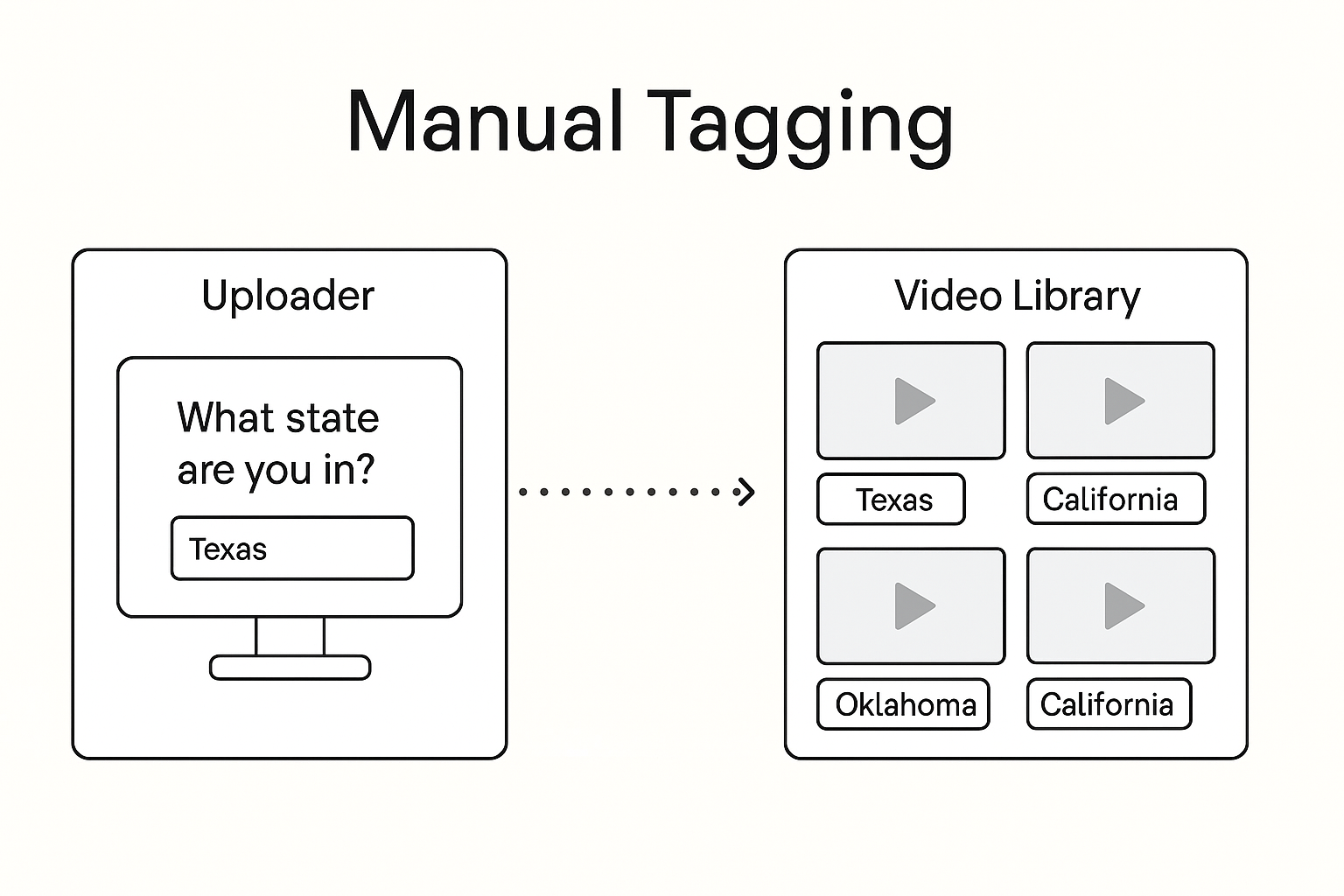
manual tagging by contributors

Option 1: Manually Add Response Options #

For simple fields like Topic, Department, or Region, you can enter the possible answers directly without using a dataset.

  1. Go to your projectโ€™s Contributor Data Collection tab
  2. Add a new question
  3. Select the response type (e.g. multi answer, single answer)
    • NB – Free text allows you to ask non-linked details (Job title etc).
  4. Type each response manually and press [Enter] after each
    • e.g. type Culture [Enter], Dance [Enter], Politics [Enter]

This method is perfect for short, fixed lists where responses are known and donโ€™t need to be tied to contributor records.


Use datasets to pre populate Vloggi contributor details

Option 2: Use a Dataset to Pre-Fill Contributor Information #

Use this method if you have structured contributor data stored externally (e.g. school rosters, staff lists, or CRM exports).

Step 1: Prepare Your File #

Create a CSV with:

  • One unique identifier column (e.g. email, student ID, employee number)
  • Up to five other columns (e.g. name, school, region)

Step 2: Upload and Configure #

  1. Navigate to My Datasets
  2. Click Upload Dataset
  3. Confirm file structure and headers
  4. Choose โ€œEach row is one contributorโ€
  5. Select your unique identifier column
  6. Confirm and preview your data

Step 3: Link Dataset to Fields #

In the Contributor Data Collection view:

  1. Add a new field
  2. Choose response type: dropdown, lookup, or multi-select
  3. Select Link to dataset and choose the relevant field

When a contributor enters their ID (or email), the system pulls their full recordโ€”e.g. name, organisation, regionโ€”automatically.

Step 4: Use Pre-Populated Data for Tagging and Search #

Once a video is submitted using a dataset-linked contributor field, Vloggi automatically converts selected fieldsโ€”such as state, store number, department, or roleโ€”into tags. These tags appear directly on each video clip in the Video Library, making it easy to sort, group, or filter submissions visually.

In addition to visible tags, all other data pulled from the dataset remains searchable in the background. This means you can perform a free-text search across all contributor fieldsโ€”even if theyโ€™re not visible as tags on the clip.

Example: You might see Texas, Retail, or Store 0045 as tags on the clip. But you can also search by email, region, or program nameโ€”even if those fields arenโ€™t tagged.


๐Ÿ” Privacy Tip: Use a lookup (type-to-search) field instead of a dropdown for sensitive identifiers like emails or student IDs. This protects privacy and avoids exposing your entire dataset to other contributors.

What are your Feelings

Share This Article :

  • Facebook
  • X
  • LinkedIn
  • Pinterest
Still stuck? How can we help?

How can we help?

Updated on 28 May 2025
Inviting Collaborators to Vote on a Video Contest: A Collaborative Judging ProcessQuick Help Guide: Downloading Raw Video Clips or Vertical Videos from Vloggi
Table of Contents
  • Overview
  • Option 1: Manually Add Response Options
  • Option 2: Use a Dataset to Pre-Fill Contributor Information
    • Step 1: Prepare Your File
    • Step 2: Upload and Configure
  • Step 3: Link Dataset to Fields
  • Step 4: Use Pre-Populated Data for Tagging and Search
Vloggi main logo
Contact Us
  • [email protected]
  • +61 1300 117093
Fishburners new logo
  • L13, 477 Pitt St, Sydney AU-2000
About Us
  • About us
  • Investor information
  • Media releases
  • Media coverage
  • About our Founder
Legals
  • Privacy Policies (EN FR ES PT IT NL)
  • Platform Use Agreement (Terms)
  • End-user Content Assignment
  • Responsible AI Use Policy
  • Data and Compliance Summary
  • Multi Region Data Hosting Policy
  • Data Processing Addendum
  • Refunds policy
  • Modern Slavery Statementโ€‹
Vloggi Resources
  • Case Studies
  • Blog
  • Free eBooks
  • FAQs
  • Help Center
  • Vloggi API Docs
Partnerships
  • Vloggi Reseller program
  • Vloggi Agency program
  • Vloggi Affiliate program
  • Vloggi white label platforms
Video Submission Use Cases
  • Video Advocacy Software
  • Video Audition Software
  • Video Testimonial Software
  • Video Student Admissions Software
  • Video Guest Wishbook Software
  • Video Reporting Software
  • Video Feedback for Government
Vloggi Comparisons
  • Vloggi vs Vouchfor
  • Vloggi vs Dropbox
  • Vloggi vs SceneIt

Copyright ยฉ 2026 Vloggi Pty Ltd. All rights reserved.
Vloggiยฎ is a registered trademark ofย Vloggi Technology Pty Ltd

New Vloggi Oggi octopus Header logo
  • Use cases
    • Video Reporting Software
    • Video Contest Software
    • Video Audition Software
    • Video Consent Software
    • Video Survey Software
    • Video Message Software
    • Video Submission Software
    • Vloggi Video Software Features
  • Industries
    • Advocacy and non-profits
    • Media & Entertainment
    • Marketing & advertising
    • Education
    • Internal communications
    • Events
    • Government
    • Travel & tourism
    • Weddings
  • Case studies
    • How metal band crowdsourced music video for $2000
    • How a premium toy brand used video to gather market research
    • Secure video auditions for NSW exam board
    • Dude Perfect Trick Shots
    • How a major union gathers grassroots supporter stories in videos
    • AVON Corporate Event Videos
    • Nick DiGiovanni Viewer Engagement
    • Hamilton Crowdsourced Music Video
    • MYOB Asynchronous Video Meetings
    • NESA Education Video Applications
    • AFTA Video Advocacy
    • JAX Tyres Customer UGC Video
    • JUCY UGC Video Contest
    • Fishburners Community Engagement
  • Resources
    • Restoring Trust in Video – Real video in the age of AI slop
    • FAQs
    • Blog
    • About us
    • Documentation
    • About Justin Wastnage
    • Free eBooks
  • Pricing
Login
Get Started