
Before you ask someone to step in front of a camera, step in front of yours. A short welcome video puts a face to your invitation, shows people what to do and makes your call-out feel like a conversation—not another form to fill in.
It sits near the top of your submission landing page, making it one of the first things visitors see. Use those first moments to say: you belong here, your story matters, and taking part is easy. You do not need a studio or a polished presenter. Record a short message, save the file to your computer and upload it to your project.
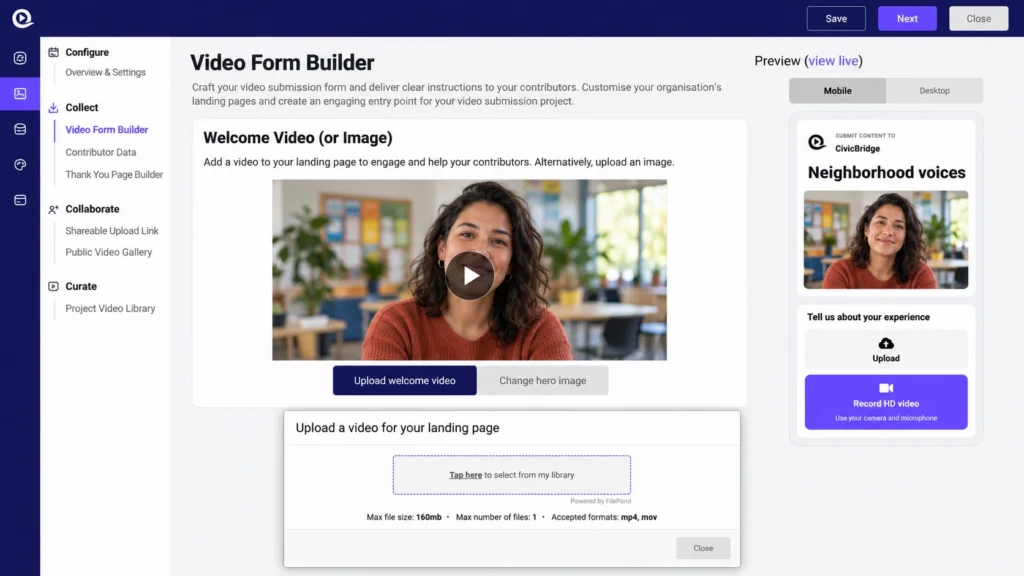
The illustration uses a fictional project and presenter. It brings together the Welcome Video (or Image) section, mobile preview and upload dialog so you can see where the welcome video goes.
What makes a welcome video worth watching?
Think of it as your personal invitation. A community organizer can explain why local voices matter. A founder can invite customers into the brand story. A contest host can show the challenge and bring the prize to life. The job is not to deliver a sales presentation—it is to make someone feel comfortable enough to contribute.
Aim for around 20–30 seconds as a starting point. Introduce yourself, ask one clear question, explain what happens to the videos and finish with a friendly invitation. If there is an incentive or a deadline, mention it briefly and put the full details in the written brief.
1. Record a quick, personal invitation
- Use your phone camera or your computer’s camera-recording app. Record outside Studio first; Upload welcome video selects a saved file.
- Choose a quiet spot and face a window or another soft light source. Put the camera at eye level.
- Look at the lens and speak to one person, as if you were inviting a friend. A natural delivery is more welcoming than a memorized speech.
- Record a couple of takes, play them back and choose the clearest one. Trim any long pause at the beginning or end.
2. Save it somewhere easy to find
Save or export the finished recording as an MP4 or MOV. Give it a recognizable name, such as neighborhood-welcome.mp4, and put it on your Desktop or in a project folder. On Windows, the Desktop or Videos folder works just as well; on a Mac, use Desktop or Movies.
If you recorded on your phone, transfer the file to your computer using your usual cable, file-sharing or cloud-storage method. Make sure the actual video is available locally—not just a share link. Play it once on the computer before uploading.
The welcome-video upload dialog shown in Studio accepts one file, up to 160 MB, in MP4 or MOV format. These are the welcome-video limits, not the limits for contributors’ submissions. If your file is too large, shorten it or export a smaller copy; simply renaming a file does not convert its format.
3. Upload it in Video Form Builder
- Open the correct project in Vloggi Studio.
- Go to Collect → Video Form Builder.
- Find Welcome Video (or Image) and select Upload welcome video.
- In Upload a video for your landing page, select Tap here to select from my library. This opens your device’s file picker.
- Find the recording on your Desktop or in the folder where you saved it, select it and let the upload finish.
- Close the dialog when the upload is complete, then select Save in the project header.
4. See it through your contributor’s eyes
Use Mobile and Desktop in the preview panel to check the layout. Then select view live to open the actual submission page and test the video playback, sound and written instructions. Check it on a phone as well as your computer before sharing the call-out.
The welcome video is your invitation, not a contributor’s submission. Keep the next action clear so visitors know how to record or upload their own response using the project’s configured workflow.
A 30-second script you can make your own
Here is a fictional community example. Replace the organization, question, purpose and deadline with your own details:
“Hi, I’m Maya Thompson from CivicBridge. What is one thing you love about your neighborhood—and one thing you would change? We would love to hear it in your own words. A short phone video is perfect. We will bring selected stories together in our community highlights film. The details are below. Send yours by Friday, and help us tell the story of the place we share. Thank you!”
For a contest, swap in the challenge and reward: “Show us your favorite weekend escape in a 20-second video for a chance to win a cabin stay for two.” Keep the eligibility, prize conditions and exact closing time in the written brief.
Small touches that make a big difference
- Start with the invitation: get to the question quickly. Skip a long logo animation or company history.
- Show the standard: a good phone recording reassures visitors they do not need professional equipment either.
- Keep the camera steady: prop up the phone or use a small stand. Leave a little room around your face and check the framing in the preview.
- Prioritize sound: turn off distracting background noise and record a short test before doing the full take.
- Help people watching silently: add readable captions to your video before uploading if you can, and repeat the key information in text.
- Make it feel current: replace the video when the campaign, prize, deadline or instructions change.
- End with one next step: invite people to share their response through the form, rather than giving them several competing actions.
Keep a clear written brief underneath
Not every visitor will play the video. In Contributor Brief, use Give your page a title, Add an incentive to encourage your contributors and Tell your contributors how to participate to repeat the essentials. Set the Expiry date if the call-out closes at a particular time, and make sure it agrees with your invitation.
Explain the intended use of the footage and complete the relevant project rules and legal settings. The video should make the invitation engaging; the written form should make the instructions and permissions clear.
Prefer a still image for this project? Use Change hero image in the same section. Either way, make the top of your call-out recognizable, welcoming and relevant to the people you want to hear from.
Next, write a landing page that encourages submissions and share your project link with the right audience.