
Vloggi lets you control what contributors see before they submit video, and how your organisation is represented on upload pages, public galleries and consent reports.
These settings are useful when you need more granular control over
- Legal entity / content owner
- Privacy policy
- Legal disclosure or Impressum
- Project-specific terms
- Additional contributor declarations
- Minor-related declarations
- Consent evidence reporting
For many projects, the default Vloggi platform terms are enough. These settings are for organisations that want the contributor experience to reflect their own legal entity, privacy policy or campaign rules.
1. Why these settings exist #
When you first set up your Vloggi account, your team name and website URL are stored as the default details for your workspace. For example, if the FreshMart marketing team creates the account and enters “FreshMart” as the company name and freshmart.com as the company URL, those details will appear by default in the legal information shown to contributors. This is fine for most use cases. However, if FreshMart’s legal team needs the copyright in submitted content to be transferred to the group holding company, FreshMart America LLC, they can set that as the legal entity. Agencies working on behalf of clients can also use these settings to make clear which client entity receives ownership of the submitted content.
A public project often has a friendly campaign name, but the legal responsibility may sit with a formal organisation.
Example:
Public campaign:
FreshMart Superstars

Public brand:
FreshMart

Legal entity:
FreshMart America LLC
The contributor may only need to see a friendly brand name, but your legal, privacy and consent records may need to identify the formal entity.
Vloggi separates these two ideas:
Public name = what contributors and viewers recognise
Legal entity = the organization that owns, controls or receives the submitted content
2. Where to set workspace defaults #
When you first set up your Vloggi account it will store team name and URL as the default.
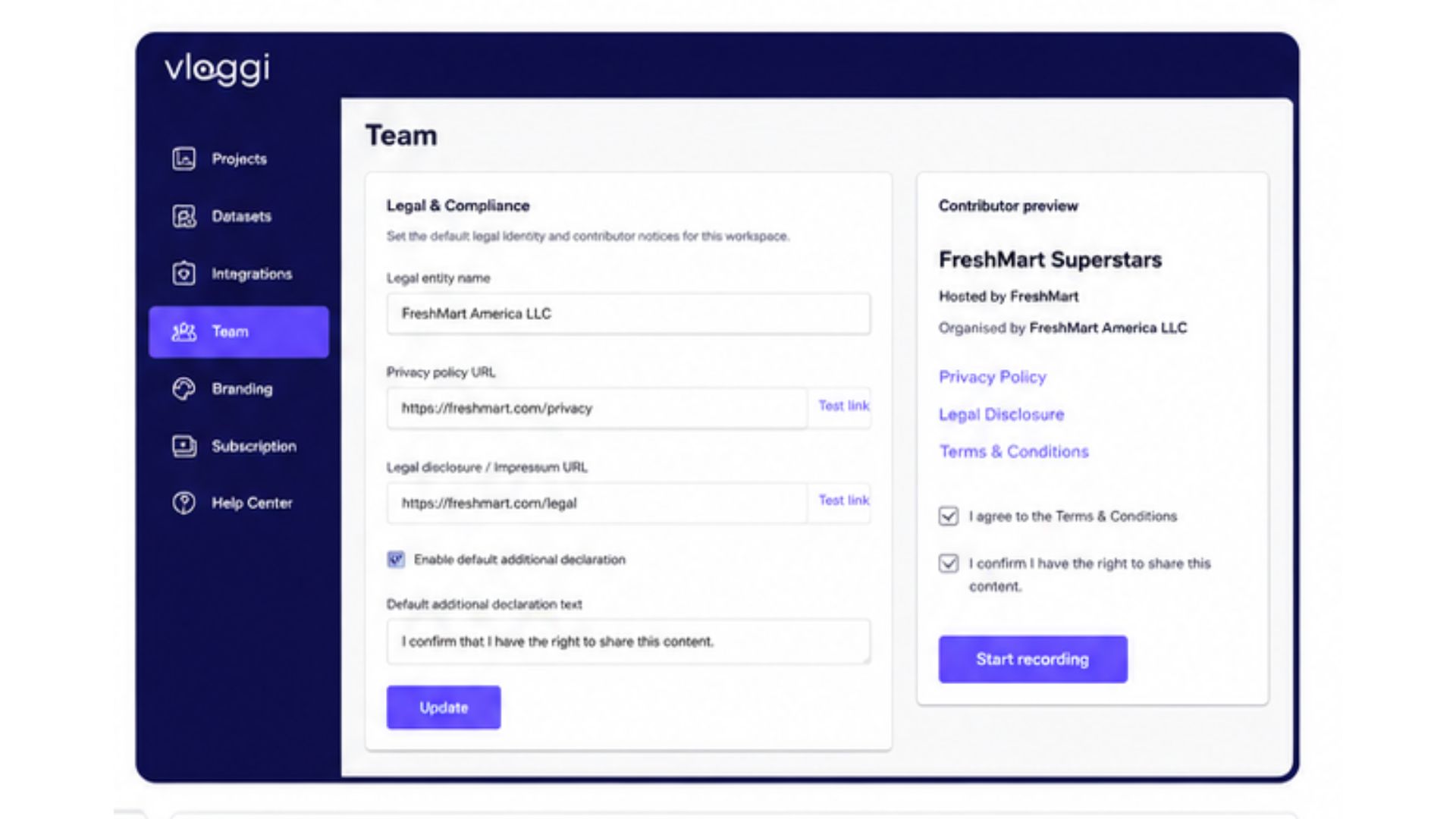
To change these, go to:
Studio → My TeamIn the Team page, set the default organization details for your workspace.
These defaults can be reused across projects:
- Public team name
- Organization website
- Organization description
- Legal entity name
- Data Controller privacy policy URL
- Legal disclosure / Impressum URL
- Default additional declaration
- Default additional declaration text
These workspace settings are useful when most projects are run by the same organization.
#
3. Where these settings appear in the project builder #
On each project, the contributor-facing legal settings appear below the upload page preview.
Go to:
Studio → Project → Video Form BuilderOn the right-hand side, below the phone/upload preview, look for:
Contributor consent legalsThis panel shows what contributors will be told before they submit.
It includes checks for:
- Your legal details
- Project legals
- Platform legals
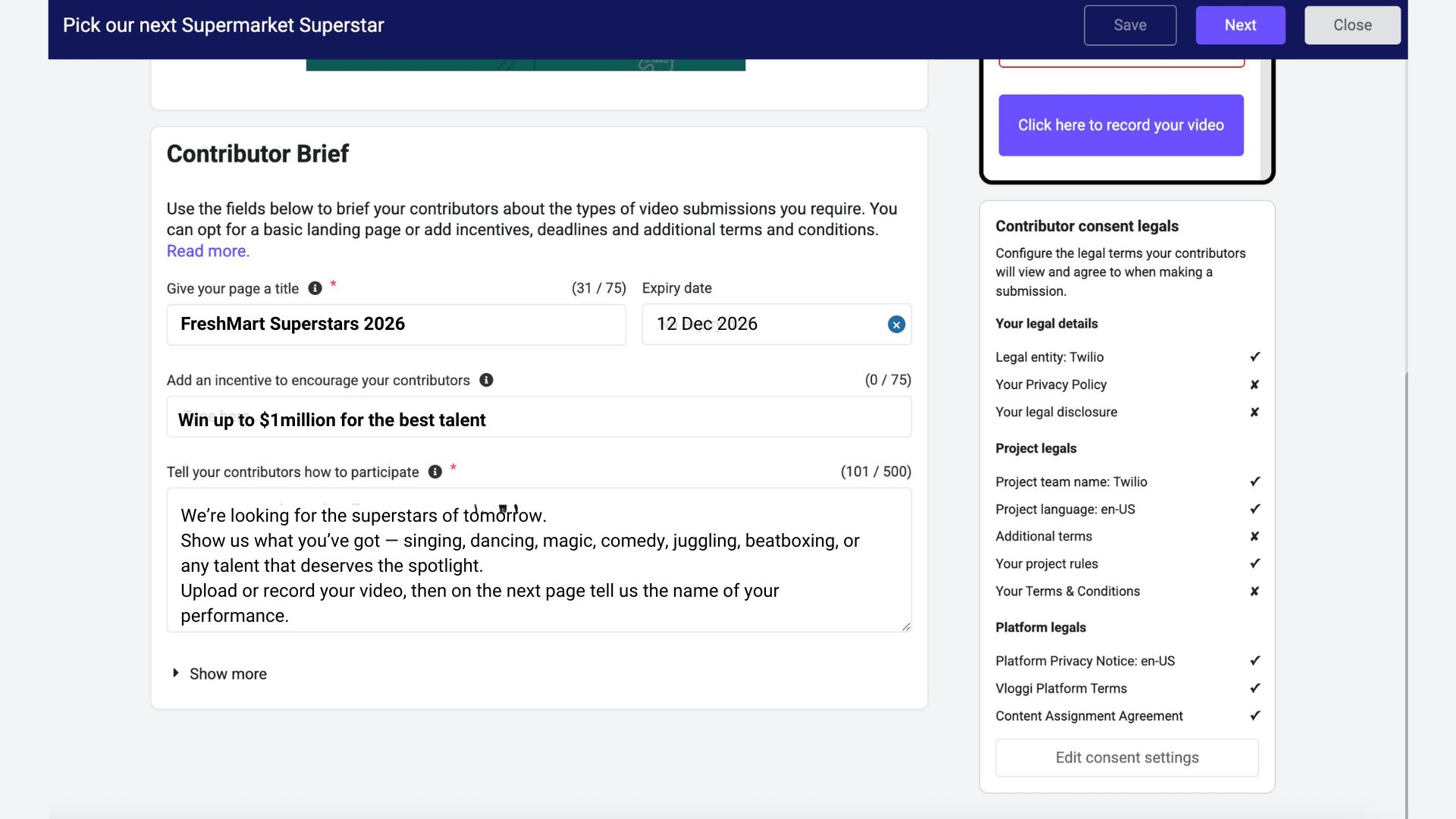
From there, use:
Edit consent settingsto configure the project’s legal details.
The preview and checklist help you see whether the project is using workspace defaults or project-specific settings.
4. Workspace defaults versus project override #
Vloggi uses workspace defaults unless a project needs different legal settings.
Order of use:
1. Project-specific legal settings, if configured 2. Workspace / team legal defaults 3. Vloggi platform defaults where applicable
Use workspace defaults when:
Most projects are run by the same organisation
The same privacy policy applies across campaigns
The same legal entity owns or controls the submitted content
Use project overrides when:
A campaign is run for a client
A school, agency or partner has its own legal requirements
A contest has its own terms
A project has different privacy or disclosure links
A campaign is run in a different country or language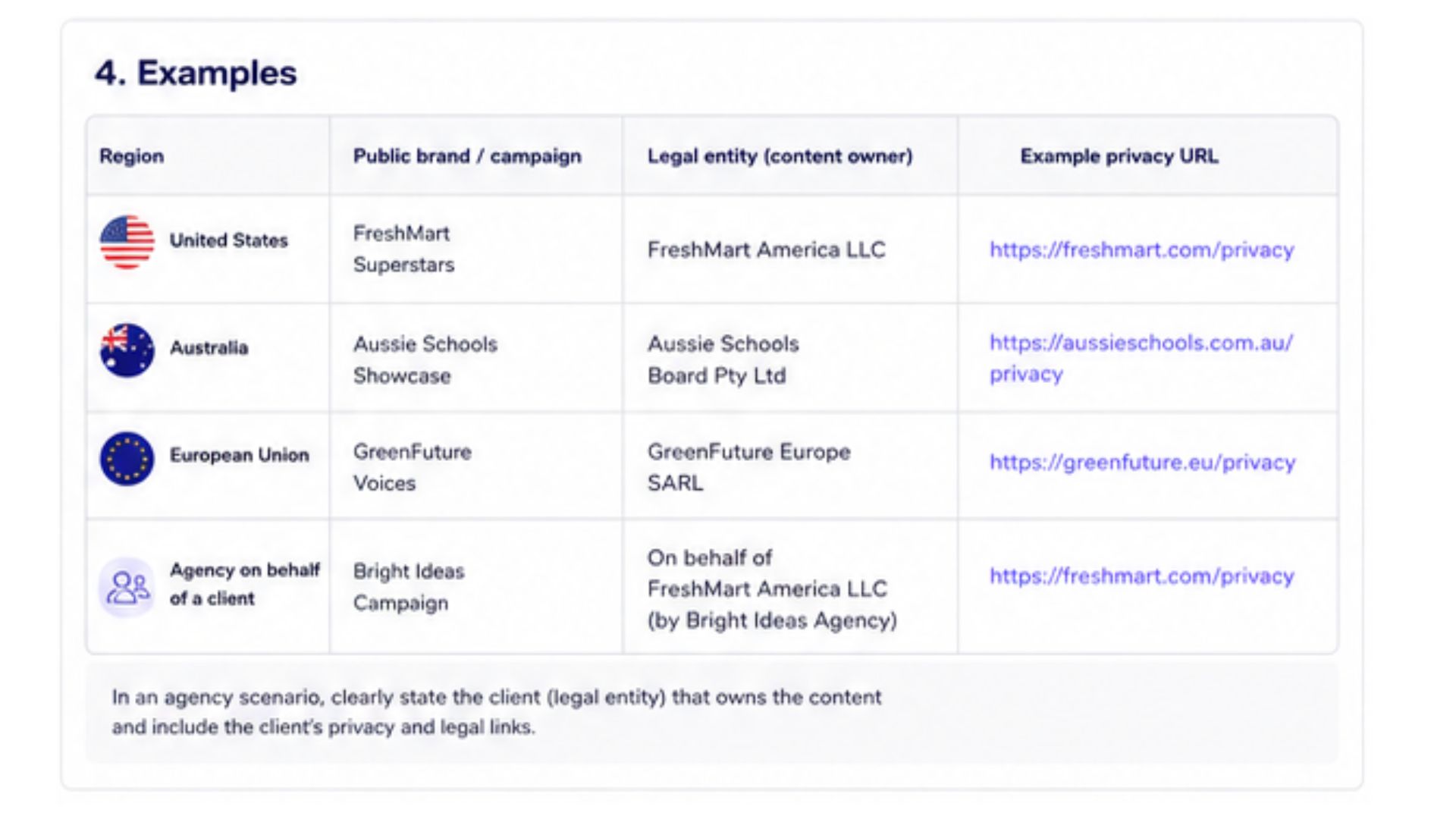
5. Key fields explained #
Public team name #
This is the friendly name shown on upload pages, galleries and project links.
Example: FreshMart
Legal entity name #
This is the formal organization that owns, receives or controls the submitted content. This should be the same as the data controller entity name.
Examples:
FreshMart America LLC
Aussie Schools Board Pty Ltd
Green Future Europe SARL
Nordstadt Bildung GmbH
This field may appear in contributor notices, consent records and your project CSV reports.
Controller privacy policy URL #
This is the privacy policy for the organisation controlling the contributor’s personal data.
Example: https://freshmart.com/privacy
Legal disclosure / Impressum URL #
This is a link to a formal legal disclosure page.
In some countries, especially in parts of Europe, this may be called an Impressum. An Impressum usually identifies the legal operator of a website or service, including details such as company name, registered address or authorised representative.
Example: https://nordstadt-schule.de/impressum
Team Terms URL #
This is a link to extra terms and conditions for the project, contest, gallery or campaign.
Use this when the project has rules beyond the standard Vloggi platform terms.
You can host the full terms on your own website and add the URL in Vloggi.
Project rules #
A simple project rules field appears in the Vidoe Form that contributors see. This is designed for lightweight legal terms that form part of the agremenet between the Project Owner and the Contributors.
Example Team Terms wording:
By submitting a video, you confirm that you created or have permission to share the content, and you grant the campaign organiser permission to review, display, edit and publish the video for this campaign and related promotional activity.Additional declaration #
The additional declaration lets you add an extra contributor confirmation checkbox. This is usually designed for industry-specific legal delcrations that cannot be captured in the project rules box.
This is useful when contributors need to confirm something specific to your campaign.
Examples:
I confirm that no minors are identifiable in this recording.

I confirm that I have permission from all people shown in this video.

I confirm that this video was filmed at the stated location.

I confirm that this submission complies with my school’s media consent policy.

I confirm that this video does not include confidential client information.
The additional declaration appears as part of the contributor consent flow.
6. Example setups #
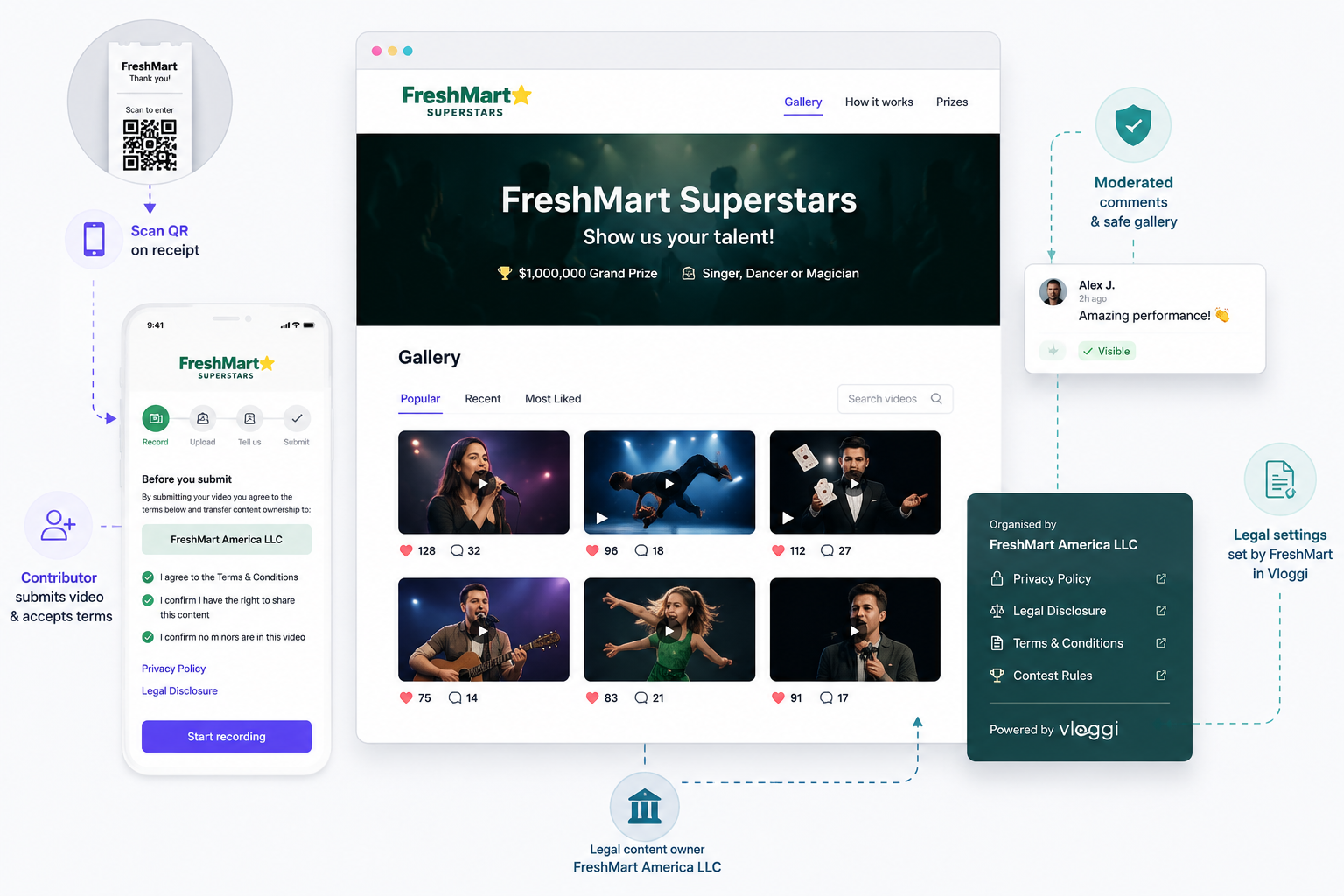
Example 1: US supermarket contest #
FreshMart, a US supermarket chain, is running a public talent contest where customers scan a QR code on their receipt to enter. The prize is $1 million for the best singer, dancer or magician.
Contributors upload their videos through Vloggi and need to see that ownership of the submitted content is being transferred to FreshMart America LLC. FreshMart then runs a public gallery where others can vote and comment on the uploaded videos. Comments are moderated, and viewers need to add their email address before they can vote or comment.
FreshMart America LLC is the responsible contest entity and is responsible for moderation, privacy and contest administration. Its privacy terms and legal links are displayed at the bottom of the Vloggi-hosted video contest page.
By setting up these legal disclosures in Vloggi, the FreshMart team can collect contributions, run a public gallery and manage the contest while clearly identifying FreshMart America LLC as the legal content owner.
Public campaign: FreshMart Superstars

Public team name: FreshMart

Legal entity: FreshMart America LLC

Privacy policy: https://freshmart.com/privacy

Legal disclosure: https://freshmart.com/legal

Team Terms: https://freshmart.com/superstars-terms
Example 2: Video auditions for an Australian school exam board #
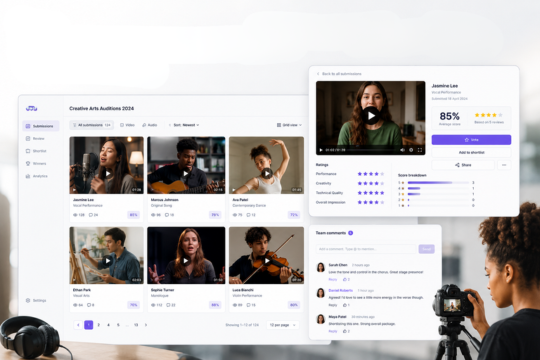
For a student-facing media submission project, Aussie Schools Showcase uses Vloggi to collect videos audition from students, teachers or schools without creating a public gallery. The project is branded as Student Media Showcase, so contributors see a familiar program name during submission, while the underlying legal and consent records identify Australian Schools Board Pty Ltd as the responsible legal entity.
Because many contributors may be minors, the project includes an additional declaration requiring the submitter to confirm that the video complies with their school’s media consent and assessment rules. This helps ensure that submissions are made by authorised students, teachers, parents or school representatives, and that any school-level permissions have been considered before upload.
The project links to the exam board’s privacy policy and legal disclosure, so contributors can see how their personal information and submitted media will be handled. Since there is no public gallery, videos are collected privately for assessment, review or showcase selection, with the legal and consent evidence retained in Vloggi’s records.
Public project: Student Media Showcase

Public team name: Aussie Schools Showcase

Legal entity: Australian Schools Board Pty Ltd

Privacy policy: https://aussieschools.gov.au/privacy

Legal disclosure: https://aussieschools.gov.au/legal
Additional declaration example: I confirm that this submission complies with my school’s media consent and assessment rules.
Example 3: European sustainability campaign #
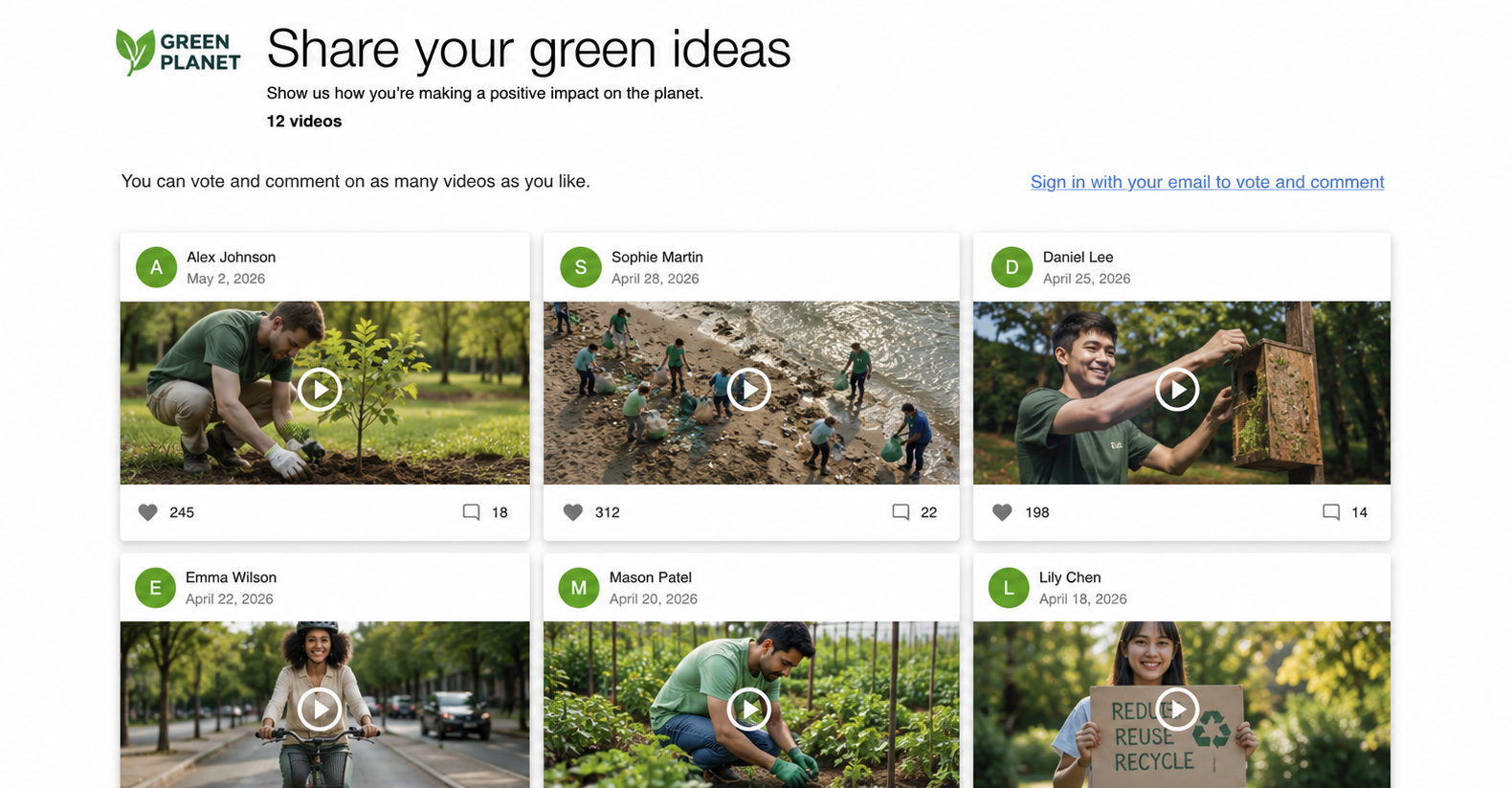
For a European sustainability campaign, Green Future uses Vloggi to collect supporter, community or employee videos under the public campaign name Share Your Green Ideas. Contributors see the friendly Green Planet branding when they submit their videos, while the legal and consent records identify Green Future Europe SRL / BV as the responsible legal entity.
Because the campaign operates in Europe, Green Future includes both a privacy policy and a legal disclosure / Impressum. The privacy policy explains how contributor data and submitted media are handled, while the Impressum identifies the organization legally responsible for the campaign. The project also links to dedicated Share Your Green Ideas terms, setting out how submitted videos may be reviewed, edited, displayed or reused as part of the campaign.
For residents of Germany, an Impressum-style legal notice provides the familiar company identification details expected on commercial websites, including the organization responsible for the campaign and its contact information. Green Future Europe can add this page and link it to Vloggi.
This setup lets Green Future run a public-facing community campaign with clear legal ownership, local disclosure requirements and campaign-specific terms, while keeping the contributor experience simple and branded.
Public campaign: Green Future Voices

Public team name: Green Future

Legal entity: Green Future Europe SRL / BV

Privacy policy: https://greenfuture.eu/privacy

Legal disclosure / Impressum: https://greenfuture.eu/impressum

Team Terms: https://greenfuture.eu/voices-terms
Additional declaration example: I confirm that all people visible in this video have agreed to appear in this campaign.
Example 4: Agency running a campaign for a client #
Agencies can use Vloggi on behalf of a client.
Example:
Agency: Bright Ideas Agency LLC

Client campaign: FreshMart Superstars

Public team name: FreshMart Superstars

Legal entity: FreshMart America LLC

Privacy policy: https://freshmart.com/privacy

Legal disclosure: https://freshmart.com/legal

Team Terms: https://freshmart.com/superstars-terms
In this case, the agency may manage the project, but the client is shown as the legal content owner or controller.
Contributor-facing use:
The public sees the FreshMart campaign.
Consent and legal records identify FreshMart America LLC.
The agency can still manage the project inside Vloggi.
7. Multilingual projects and legal terms #
Vloggi can display many interface buttons and labels in multiple languages. Read more about multilingual Vloggi project settings.
For example, standard buttons such as:
- Submit
- Record video
- Upload file
- Privacy Policy
- Terms & Conditions
may appear in the selected project language where translations are available.
Vloggi’s own platform privacy notice and platform terms may also be available in supported languages.
However, your organization’s legal terms, privacy policy, additional declarations and campaign rules are your own content. You should provide those in the language needed for your contributors.
For example:
If your project is in French, add French campaign terms. If your project is in German, link to the German Impressum or legal disclosure. If your project is bilingual, link to a bilingual terms page.
8. Where contributors see these settings #
Contributor-facing legal settings may appear:
- On the upload page
- Near the consent or submit step
- Below the upload preview in the builder
- As links to privacy policy, legal disclosure or terms
- As required confirmation checkboxes
- On public contest gallery footers
- In consent evidence reports
In the project builder, the legal panel appears below the preview so you can check what will be shown before the project is shared.
9. Consent Evidence Report CSV #
Vloggi can generate a downloadable Consent Evidence Report for a project.
This report is designed to help show who submitted content, when they submitted it, what consent reference was created, and which legal settings were active for the project.
You can find it in:
Studio → Project → Compile / Project DownloadsLook for the project’s CSV consent report or Consent Evidence Report.
The report can include:
Consent reference
Project name
Contributor name
Contributor email
Contributor IP address
Consent granted timestamp
Upload created timestamp
File status
Content owner / legal entity
Privacy policy URL
Legal disclosure URL
Minor declaration status
Additional declaration status
Additional declaration text
Location / place metadata
Tags
Question responses
Example filename:
FreshMart America LLC FreshMart Superstars consent report created at 2026-07-02 10-30.csvExample CSV fields:
CONTENT OWNER:
FreshMart America LLC

PRIVACY POLICY URL:
https://freshmart.com/privacy

LEGAL DISCLOSURE URL:
https://freshmart.com/legal

ADDITIONAL DECLARATION TEXT:
I confirm that all people visible in this video have agreed to appear in this campaign.
Use this report when you need a record of contributor consent, rights clearance or project-level compliance settings.
10. Practical notes #
You do not have to complete every legal field for every project. These fields exist so organizations with specific legal, privacy or compliance requirements can add the right level of detail.
Good practice for more formal projects:
Use the public team name for the friendly brand
Use the legal entity name for the formal organisation
Add a privacy policy URL when collecting contributor details
Add a legal disclosure or Impressum where required
Use Team Terms for contest rules or campaign-specific terms
Use additional declarations for project-specific confirmations
Download the Consent Evidence Report when you need records
11. Before sharing your project #
Before sending an upload link or launching a public gallery, check:
- The public name looks right
- The legal entity is correct, if required
- Privacy and legal links open correctly
- Any terms page is in the right language
- Any additional declaration is clear
- The upload page preview looks correct
- The public gallery footer looks correct
- The Consent Evidence Report shows the expected legal entity


