
A great video form makes someone think: “I know exactly what to share—and I want to take part.” Your AI assistant can help you get there faster. Give it the audience, the purpose and Vloggi’s field limits, then ask for a personal invitation rather than a generic marketing landing page.
This guide gives you a reusable master prompt, three contest prompts and three employee prompts. Use them with your preferred AI assistant, review the result, then paste the copy into Collect → Video Form Builder. You are using AI to write the invitation—not to replace the real people and stories you want to collect.
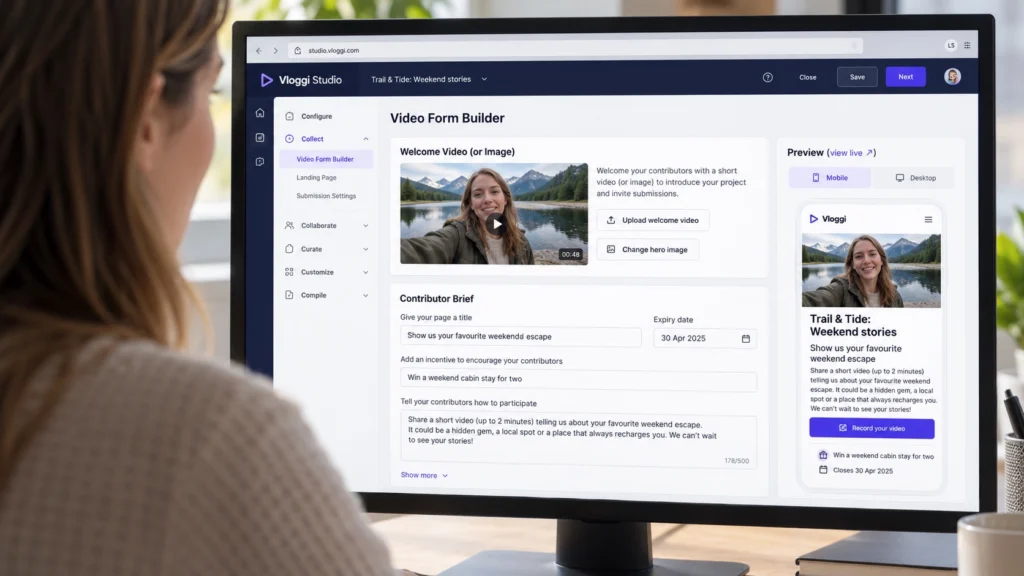
Give your AI a brief before asking it to write
- Who is contributing? Loyal customers, first-time visitors, fans, frontline workers or managers?
- What do you want? One specific story, demonstration, idea or moment—not “some engaging content”.
- How will they contribute? Upload an existing clip or record a response, matching the workflow you have enabled.
- What is in it for them? A relevant prize, recognition, a chance to influence decisions or an opportunity to be part of your brand story.
- Where will the videos go? Internal review, a public campaign or another approved use. Tell the AI what is actually agreed.
- What are the practical details? Suggested clip length, audience language, closing date and time zone, eligibility, judging method and the approved terms link.
Do not paste customer records, employee personal information or confidential project material into an AI tool unless your organization has approved that use. A fictional example or a short, non-sensitive campaign summary is usually enough to draft the invitation.
Write for the fields, not for a full web page
| Studio field | Character limit | What to write |
|---|---|---|
| Give your page a title | 75 | Lead with the action or opportunity. |
| Add an incentive to encourage your contributors | 75 | Make the reward specific; leave blank if there is none. |
| Tell your contributors how to participate | 500 | Explain what to film, how to contribute and why it matters. |
| Project rules shown on the landing page | 500 | Summarize approved eligibility, entry rules and restrictions. |
| Share some tips to get the better video contributions | 500 | Give a few simple filming tips. |
| Link to your own terms and conditions | 250 | Paste your real, approved URL—not AI-generated legal text. |
These are character limits, not word limits. Spaces and punctuation count. The rules, tips and terms-link fields are under Show more. Set the Expiry date in the date selector as well; mentioning a deadline in your copy does not configure it.
Do not use emojis in Vloggi form copy. Ask for plain text without emoji, decorative symbols, HTML or Markdown formatting. Use real words to bring the invitation to life. AI character counts can be wrong, so treat the counters in Studio as the final check and leave a little room below each limit.
Copy this master prompt into your AI assistant
Replace the brackets with your campaign details. Then add one of the six scenario prompts below, or describe your own project.
Act as a conversion copywriter helping me create a Vloggi video submission form. Write a warm, specific invitation that makes this audience feel their contribution matters. Avoid hype, jargon and generic phrases such as "unlock your potential".

Campaign: [name and purpose]
Audience and language: [who will contribute]
Video request: [one clear subject or question]
Workflow: [upload an existing clip / record a response]
Suggested video length: [length]
Incentive: [confirmed reward and how it is earned, or none]
Deadline and time zone: [confirmed details, or no deadline]
Intended use and audience for the footage: [approved details]
Eligibility and judging: [approved rules, if applicable]
Terms URL: [approved URL, if applicable]
Brand tone: [three useful words]

Ask me about missing essentials before writing. Never invent prizes, deadlines, permissions, anonymity, legal terms or product capabilities.

Return these fields separately, using these exact labels and maximum character counts, including spaces and punctuation:
Give your page a title: 75
Add an incentive to encourage your contributors: 75
Tell your contributors how to participate: 500
Project rules shown on the landing page: 500
Share some tips to get the better video contributions: 500
Link to your own terms and conditions: 250

Use plain text. No emojis, decorative symbols, HTML or Markdown in the field copy. Leave optional fields blank when not applicable. Do not invent a terms URL. Put character counts on a separate line after each field, not inside the copy. Check every field and shorten anything over its limit. Give me three title options and one recommended set of the other fields. Finish with a short list of facts I need to check before publishing.
Three contest prompts to get people excited
These are fictional starting points. Replace the reward and campaign details with your approved offer before publishing.
1. A customer adventure contest
Use the master prompt above for a fictional outdoor brand, Trail & Tide. Invite existing customers to upload a 15–30 second clip of their favourite weekend escape using our product. Make them feel part of a community of everyday adventurers, not professional creators. The proposed prize is a weekend cabin stay for two; ask me to confirm the package, eligibility, closing date and judging criteria before drafting final copy. Selected clips are intended for our public marketing, subject to the permissions collected. Lead with the experience and one simple filming request. Do not ask for a positive review.
2. A fan challenge worth sharing
Use the master prompt above for a fictional music venue, Harbour Sessions. Invite fans to record a 20-second answer to: "Who was your musical inspiration, and why?" The proposed incentive is backstage access for a selected winner; ask me to confirm artist approval, age restrictions, event details, deadline and selection method. Make the invitation feel like a chance to join the story of live music. Ask for spoken answers, not copyrighted song performances. Explain the intended public use without implying that submitting guarantees a feature.
3. A monthly product-in-action challenge
Use the master prompt above for a fictional cookware brand, Northline Kitchen. Invite customers to upload a short clip showing one clever way they use a product. The proposed monthly prize is a refund of the winning customer’s purchase; ask me to confirm the refund cap, proof-of-purchase requirements, eligible products, deadline and judging criteria. Make it practical and playful. Encourage real kitchens, not polished commercials. Selected videos may appear in our marketing under the agreed permissions. Do not invent contest terms.
Three employee prompts that sound like people, not HR templates
1. Employee ideas that lead to action
Use the master prompt above for an internal employee campaign. Ask colleagues to record a 30–45 second response to: "What is one change that would make your working day easier?" Use a respectful, welcoming tone for frontline and office teams. There is no prize. The benefit is having a voice in improvements. Ask me who will review the videos, whether participation is voluntary and how we will report back before making those statements. Do not promise anonymity or confidentiality unless I confirm the exact arrangements. Ask people not to include customer details or sensitive personal information.
2. Recognize the colleague who made a difference
Use the master prompt above for an employee recognition project. Invite a 20–30 second story about a colleague who helped the team, focusing on one concrete moment rather than generic praise. Make it warm and inclusive, without pressuring people to appear on camera. There is no cash prize. Ask me to confirm where the videos will be shown, whether named colleagues need approval, the deadline and the recognition process. Do not imply every nominee will win an award. Keep confidential work and personal details out of the brief.
3. Share practical knowledge with new starters
Use the master prompt above for an internal learning project. Ask experienced colleagues to record one practical tip they wish they had known on their first day. Suggest 30–60 seconds and one clear example. The intended audience is new starters, not public marketing. Ask me to confirm the review process and approved filming locations. Make it encouraging, not corporate or patronizing. Remind people not to film while performing hazardous work or reveal confidential systems. Do not turn personal tips into unverified safety instructions.
Ask for a stronger second draft
The first version is a starting point. Tell your AI what feels wrong instead of asking it to “make it better”. Try this follow-up:
Rewrite the invitation so it sounds like one person speaking to another. Put the reason to participate first. Replace vague benefits with the real benefit from my brief. Make the filming request more specific and remove any sentence that does not help someone take part. Keep all confirmed facts, field labels and character limits. No emojis. Recheck the counts and flag anything that still needs my approval.
Paste, preview and make the invitation yours
- Open your project and go to Collect → Video Form Builder.
- Paste each answer into its matching field. Do not paste the AI’s labels, counts or commentary into the form itself.
- Check the counters. If a field is too long, ask the AI to shorten it without losing the action, reward or essential instruction.
- Set the Expiry date where relevant and review Show more for rules, filming tips and your terms link.
- Review Additional legal settings. The project rules are not a replacement for consent, privacy information or content assignment.
- Add a welcome video or relevant image, then check the Mobile and Desktop previews. Read it out loud: does it sound like your organization?
- Select Save, then use view live to check the actual contributor page before sharing it.
Your AI can write the first draft. You decide what you are asking for, what you are promising and how the videos will be used. That combination is what makes a form feel both easy to complete and worth completing.
Next: add a personal welcome video, choose an incentive your audience wants and put your upload link in front of the right people.